

Free wedding seating chart
Seat everyone. Keep the peace.
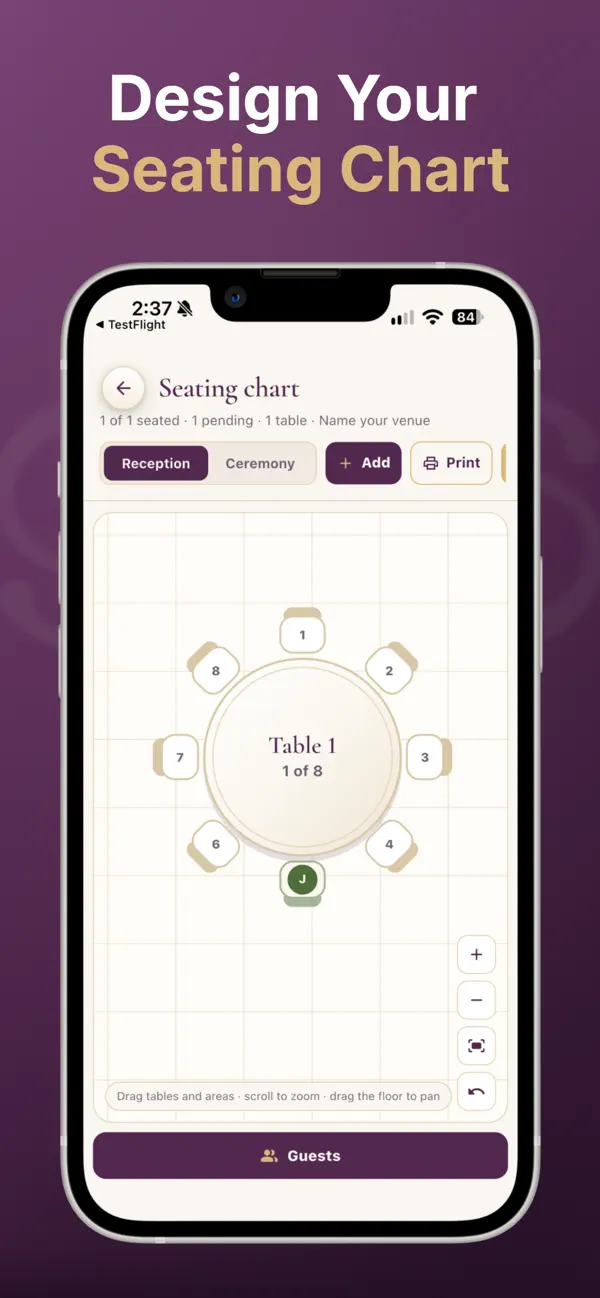
Drag guests or whole parties onto tables, see the meals on every table, and send your caterer a live link. Free, with no guest cap, on your phone and your laptop.
How to make your seating chart
- Bring in your guest list. RSVPs from your Lazo wedding website land in your list on their own, or import a CSV from The Knot or Zola.
- Add your tables. Choose the shapes your venue has and lay out the room.
- Seat parties, not just people. Drag a guest or a whole party onto a table. Or ask June to seat everyone by party and side, then adjust.
- Check the meals. Every table shows its meal counts from the RSVPs, so the kitchen gets the right plates.
- Share it. Your caterer gets a live link, so the counts they see are always the current ones.
- Round
- Long
- King's table
- Serpentine
- Sweetheart
The ceremony, too
Your side, their side
Rows on both sides of the aisle, named for each of you.
The front rows
Reserve rows for family and the people who matter most.
Processional and ushers
Plan who walks when, and print an usher list for the door.
Seating chart questions
Is it really free?
Yes, with no guest cap. Every couple tool on Lazo is free forever: seating, guest list, budget, wedding website and June.
Can my partner work on it with me?
Yes. You share the same plan, on your phones and on the web.
Can I import my guest list?
Yes. Export it from The Knot or Zola as a CSV and import it in one step. How switching works.
How do I handle guests who shouldn't sit together?
Seat by party first, then move the few people who need it. Our wedding guest etiquette guides cover the awkward ones.
Start with the list. June helps with the rest.
Free on iPhone, Android and the web.